


AV PanelForge Player for Mac
macOS 13 Ventura or later, on Apple silicon or Intel
Download for Mac
Q-SYS · Crestron · Aurora Multimedia
Build enhanced interfaces that drive control without writing code.
How it works
AV PanelForge has three work areas. Move through them in order.
Lay out or bring in your panel.
Connect it to your control system.
Send it where it needs to run.
Your panel. Your choice.
Choose a starting point to follow it through PanelForge. Or choose an output to see what can reach it.
Anything in
Anything out
Import your Q-SYS Designer touch panel into PF. Send it to an Aurora Multimedia panel with no plugins or extra hardware required, or to a Crestron panel, make a stand-alone PF Player app for Mac or PC, or export a .uci file or a control-system-compliant CSS file. You can even make it a Crestron panel for a Crestron project, using AV PanelForge in place of Crestron Construct (Beta).
The real app
Lay out your panel pages, buttons, and styles.


Connect controls to your Q-SYS design or set joins to work with your SIMPL file.


Choose where the panel should go, then create files or send them to a device.


Live CSS
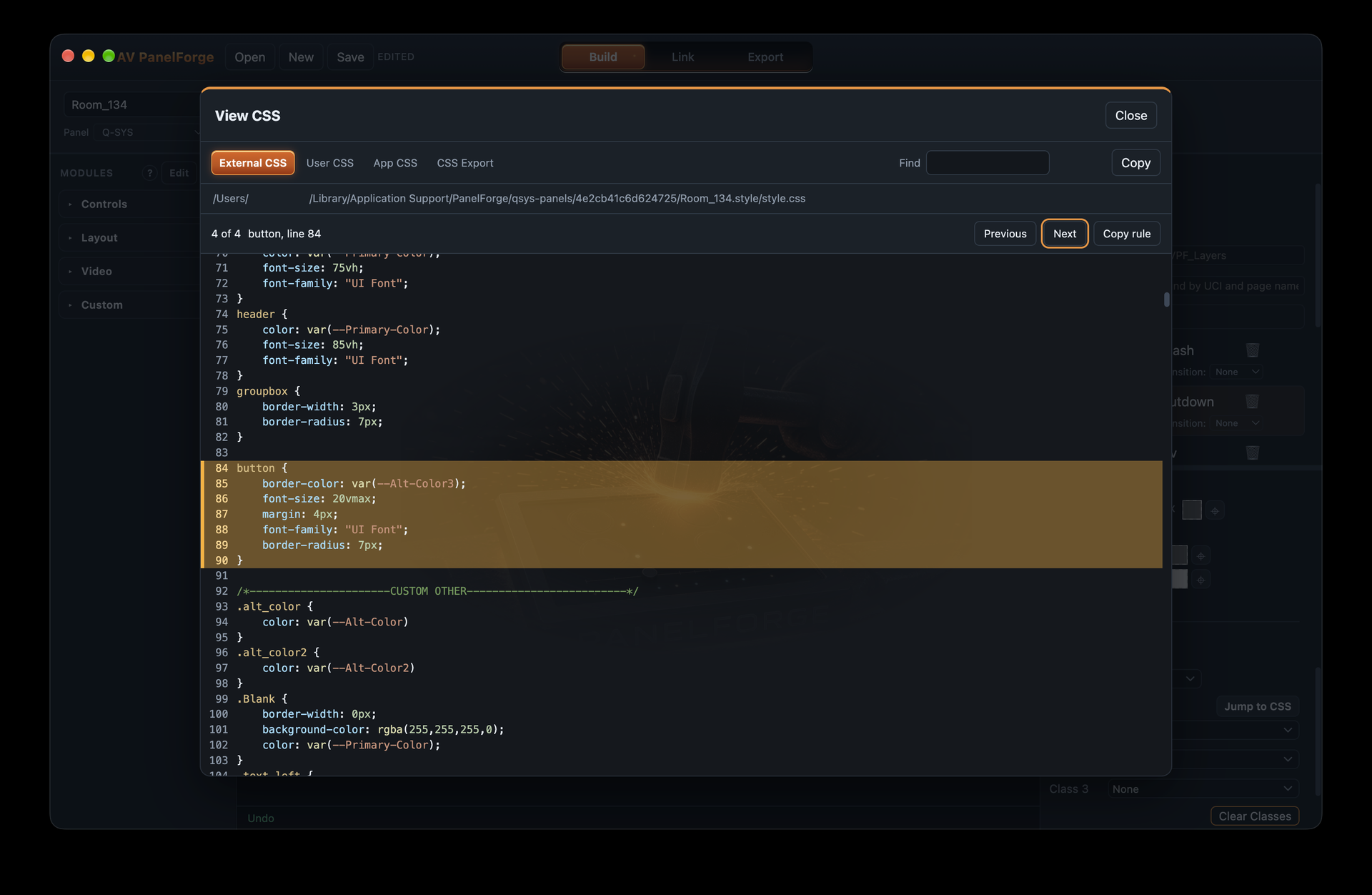
Import your external CSS and see it live on the Build canvas, so you always know what your panel will look like on the glass. When you change the external CSS, the canvas updates instantly, with no reloading or rebooting. Want to know why a button looks the way it does? Jump straight to the CSS rule behind it. You get to see what's happening behind the scenes and pick up CSS as you go. For now you can view and copy the CSS written to your panel, or export it. Full live CSS editing in the app is coming soon.
A handy tip
You can demo fully working touch panels to your clients on a Crestron or Aurora Multimedia touch panel without a Q-SYS Core. All you need is your computer running AV PanelForge, a small PoE switch, and your touch panel.
Who it's for
Spend less time on panel layout and more time on the system.
Hand clients panels that look great and run on the screens they already own.
Show a working panel early, so everyone agrees on it before install day.
Downloads
AV PanelForge Player runs your panels on a Mac or Windows PC. It is free to download and use.
The full AV PanelForge app is available by request.
macOS 13 Ventura or later, on Apple silicon or Intel
Download for MacWindows 10 or 11, 64-bit, on Intel or AMD
Download for Windows (x64)Windows 10 or 11, 64-bit, on ARM (such as Snapdragon)
Download for Windows on ARM8 GB of memory recommended (4 GB minimum).
Questions? Use the contact form.

Let’s talk
Tell us what you’d like to build, or ask us a question.
We got your message and will be in touch soon.

ALSO FROM PITCHFORK SOFTWARE
Clean up architectural floor plans and build complete AV drawing packages faster.